
Invoicefy
Invoice from the same board you do the work on.
Create, manage, and track invoices right from your Trello cards, keeping billing in the same place as the work.
- Add and edit invoices directly on cards
- Filter by paid, unpaid, partially paid or overdue
- Automatic totals plus Excel export for reporting
Free for 7 days. Cancel any time before the trial ends and you pay nothing.
Invoicefy (Manage and track invoices on cards)
Never lose track of an invoice again! Invoicefy streamlines your finances by simplifying invoice tracking. Add expenses directly to our user-friendly list, gain instant budget insights, and effortlessly review detailed spending information. Stay on top of overdue invoices and ensure smooth reconciliation. Get started today and take control of your invoices!
Simply list your invoices on the Trello board
Our power-up automatically sums up all the invoices for you at the top of the card. No confusing features, just easy invoice tracking!
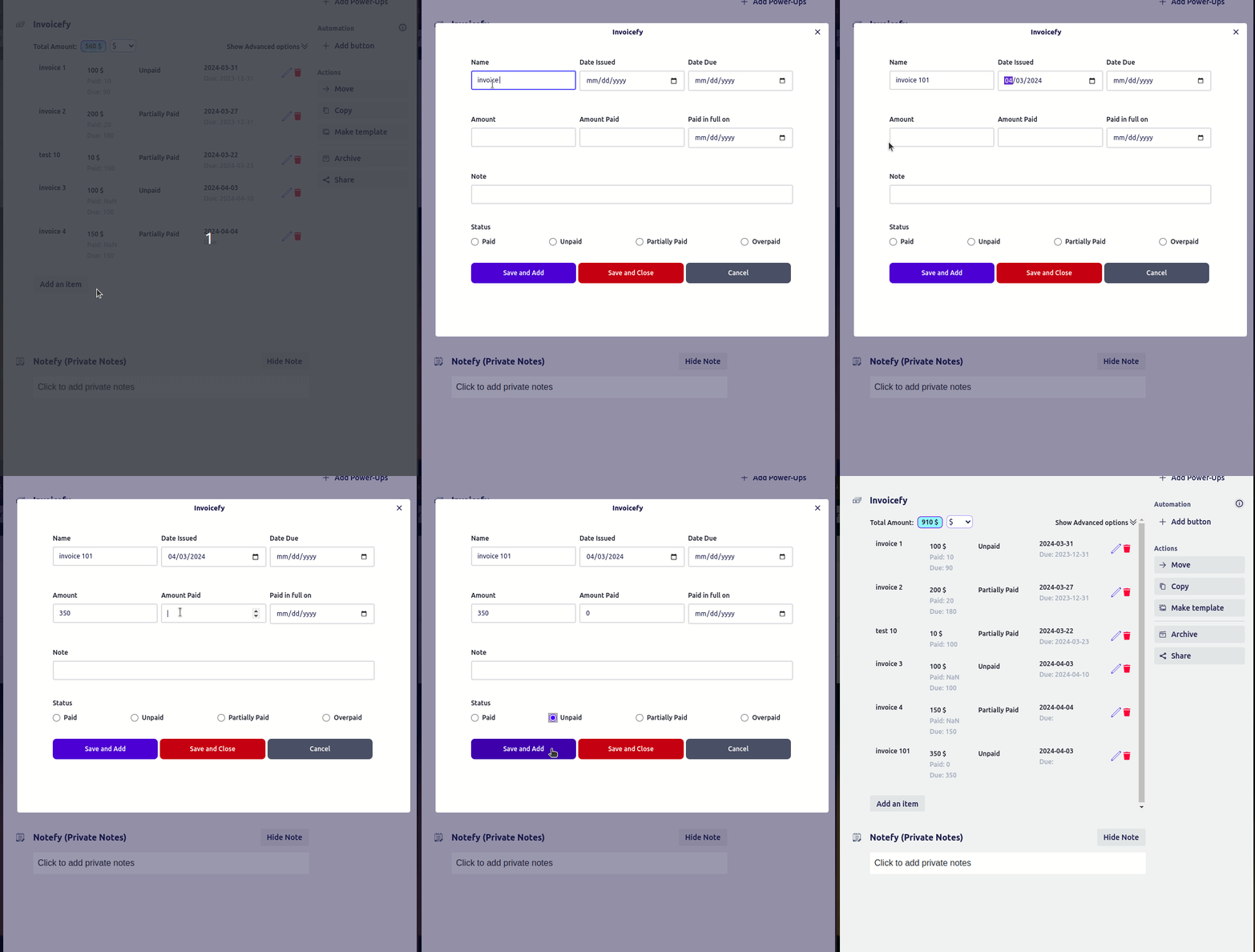
See your invoices at a glance
No need to worry about calculating the total amount of invoices we already have done that for you.

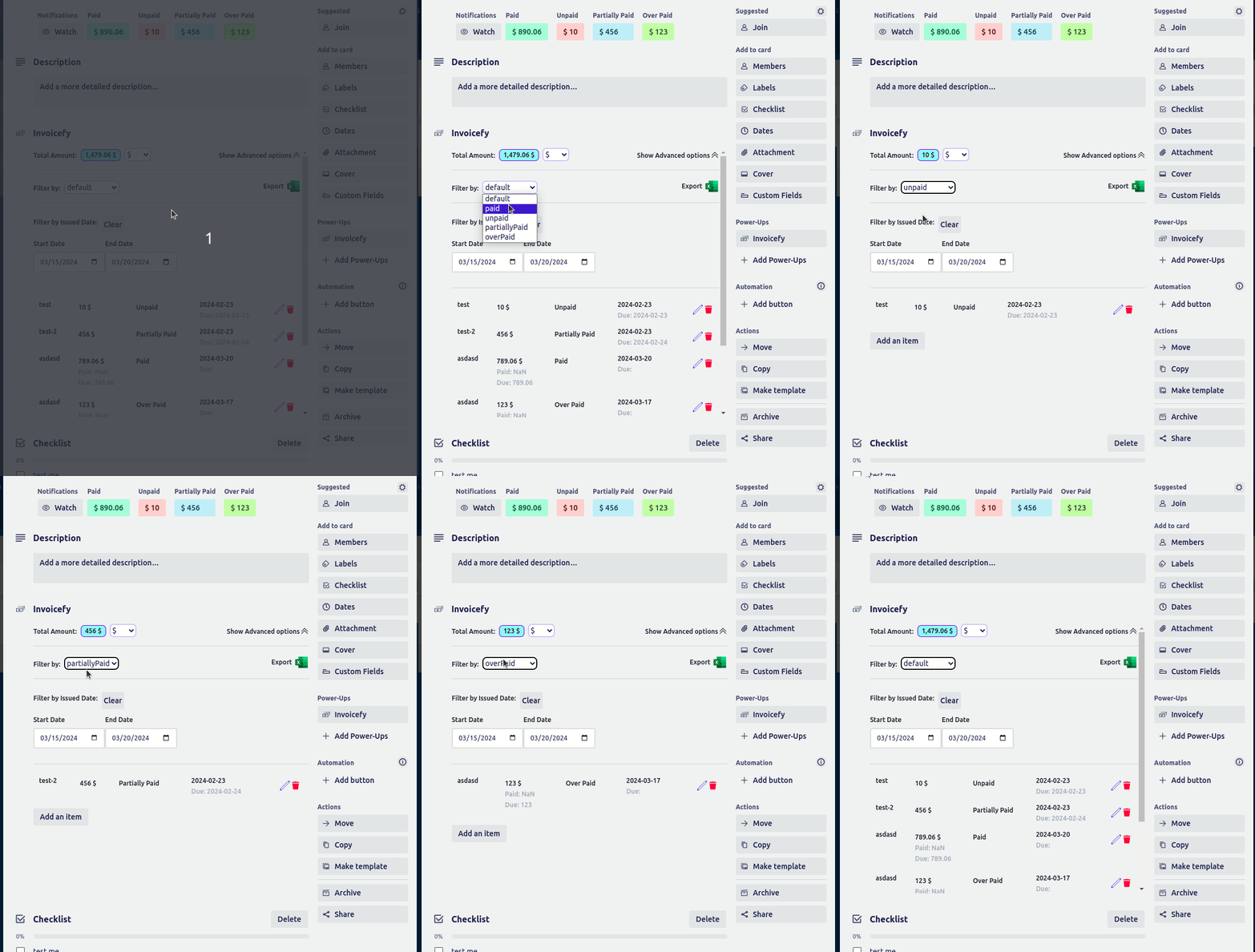
Filter expenses by category (paid, unpaid, partially paid or over paid)
You can filter the Invoices by category. Easily filter transactions for clear insights.
Export the invoice to Excel Sheet
Export all the invoices to Excel Sheet from the individual card or export all the invoice of all cards to single Excel Sheet.

Export all the invoices of the board to Excel Sheet
Export all the invoices to Excel Sheet from the individual card or export all the invoice of all cards to single Excel Sheet.

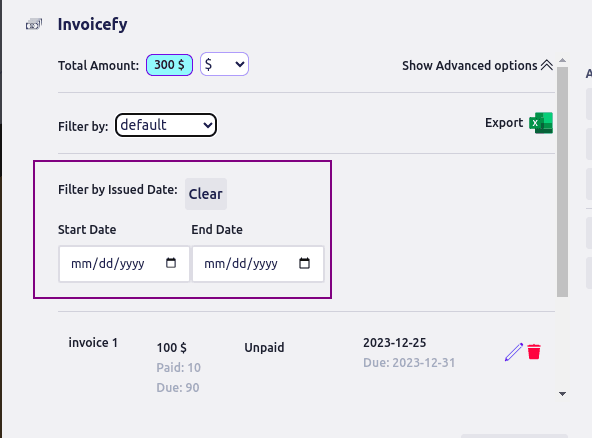
Powerful filtering.
Filter expenses by date range to see exactly what you want.
Stripe Customer Portal
Access and manage/cancel your subscription details effortlessly in the Stripe Customer Portal. Modify your plan, update payment methods, review billing history or cancel your subscription with ease, all in one secure location. Designed for a seamless user experience, our portal simplifies subscription management for all users.

Try Invoicefy on one of your boards
It installs from the Trello directory in seconds. Every feature is unlocked for 7 days.
Questions before you start
Is Invoicefy free to try?
Yes. Every plan starts with a 7-day free trial with full access to every feature. You can cancel at any point during the trial and you will not be charged.
How much does Invoicefy cost after the trial?
Invoicefy on its own is $5.99/month or $49/year. If you use more than two of our Power-Ups, the All Power-Ups bundle is better value at $12.99/month or $99/year and includes everything we make.
Do I pay per person, or is there a Workspace plan?
Both. A personal subscription covers you across unlimited boards and workspaces. For a whole team, a Trello workspace admin can buy a Workspace plan for $9.99/month from inside the Power-Up. It covers everyone in that workspace on every board, with no per-seat counting, so it is cheaper than individual plans from 2 people up. The Workspace plan is for one Power-Up.
Can I cancel whenever I want?
Yes. Manage or cancel your subscription yourself in the Stripe customer portal, reachable from inside the Power-Up. There is no contract and no cancellation fee.
Does Invoicefy work with the rest of my board?
Invoicefy installs from the Trello Power-Up directory and works inside your existing boards. There is nothing to configure, no separate account to create, and it supports Trello's dark mode.
What happens to my data?
Your board data stays in Trello. We do not sell it, and we do not need to see it to do our job. Full details are in our privacy policy.
Often used with Invoicefy
All included in the $12.99/month bundle.
Expensefy
FinanceTrack expenses directly on your Trello cards, keeping financial details organized without ever leaving your board.
7-day free trialExcelefy
Data ExportExport and import your Trello cards to and from Excel in a couple of clicks — ideal for data-heavy projects or migrating cards between boards.
7-day free trialWordefy
DocumentationTurn any Trello card into a fully formatted Word document — perfect for reports, briefs, or detailed documentation.
7-day free trial


Need Invoicefy to do something it doesn't?
We take feature requests and build custom Power-Ups. Describe what you need and we reply within 48 hours with whether it can be done and a rough price.
Invoicefy
7-day free trial, then $5.99/month