Data Export

Excelefy

Move cards between Trello and Excel in two clicks.

Export and import your Trello cards to and from Excel in a couple of clicks — ideal for data-heavy projects or migrating cards between boards.

  • Export any board or list straight to .xlsx
  • Bulk-create cards by importing a spreadsheet
  • Keep custom fields, labels and members intact

7-day free trial · No credit card to install · Cancel anytime

Excelefy on its own

$5.99/month

or $49/year — save 32%


Using more than two Power-Ups? The All Power-Ups bundle is $12.99/month for every Power-Up we make — including the ones we release next.

Compare plans →
  • Unlimited boards and workspaces
  • Billed per person, not per board
  • Cancel in one click, no contract

Excelefy (Export and Import Trello Cards to Excel)

One Power-Up for both directions. Excelefy exports your Trello board to Excel or CSV with every field it can read back — lists, descriptions, dates, labels, members, checklists, covers and custom fields — so you can export a board, edit it in a spreadsheet, and import it again to update the cards you already have.

Export board and cards to Excel or CSV
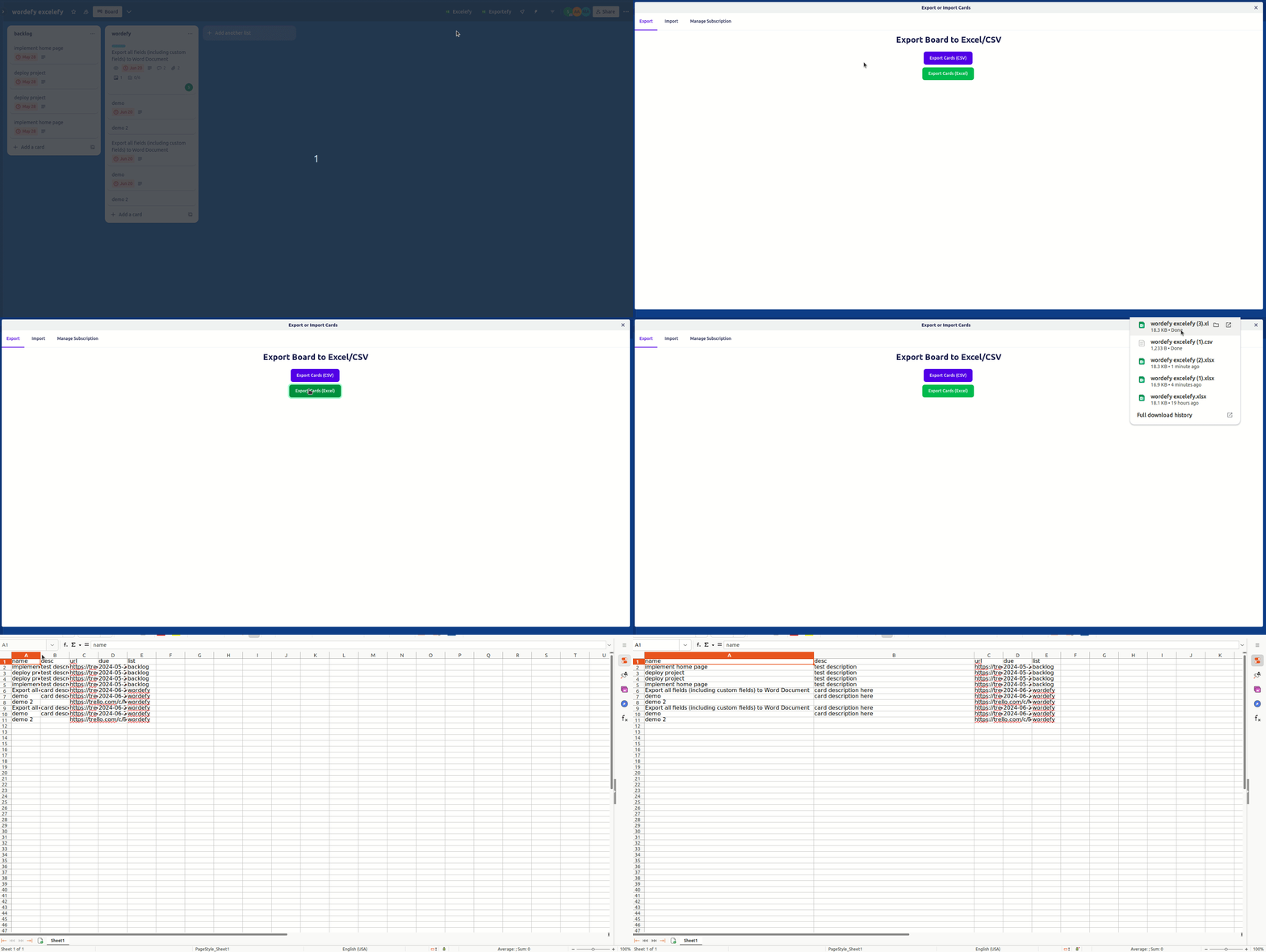
Send every card on your board to a spreadsheet with one click. The export carries the full card — list, name, description, due and start dates, labels, members, checklists, cover colour and custom fields — not just a name and a link.
export

Import cards from an Excel or CSV file
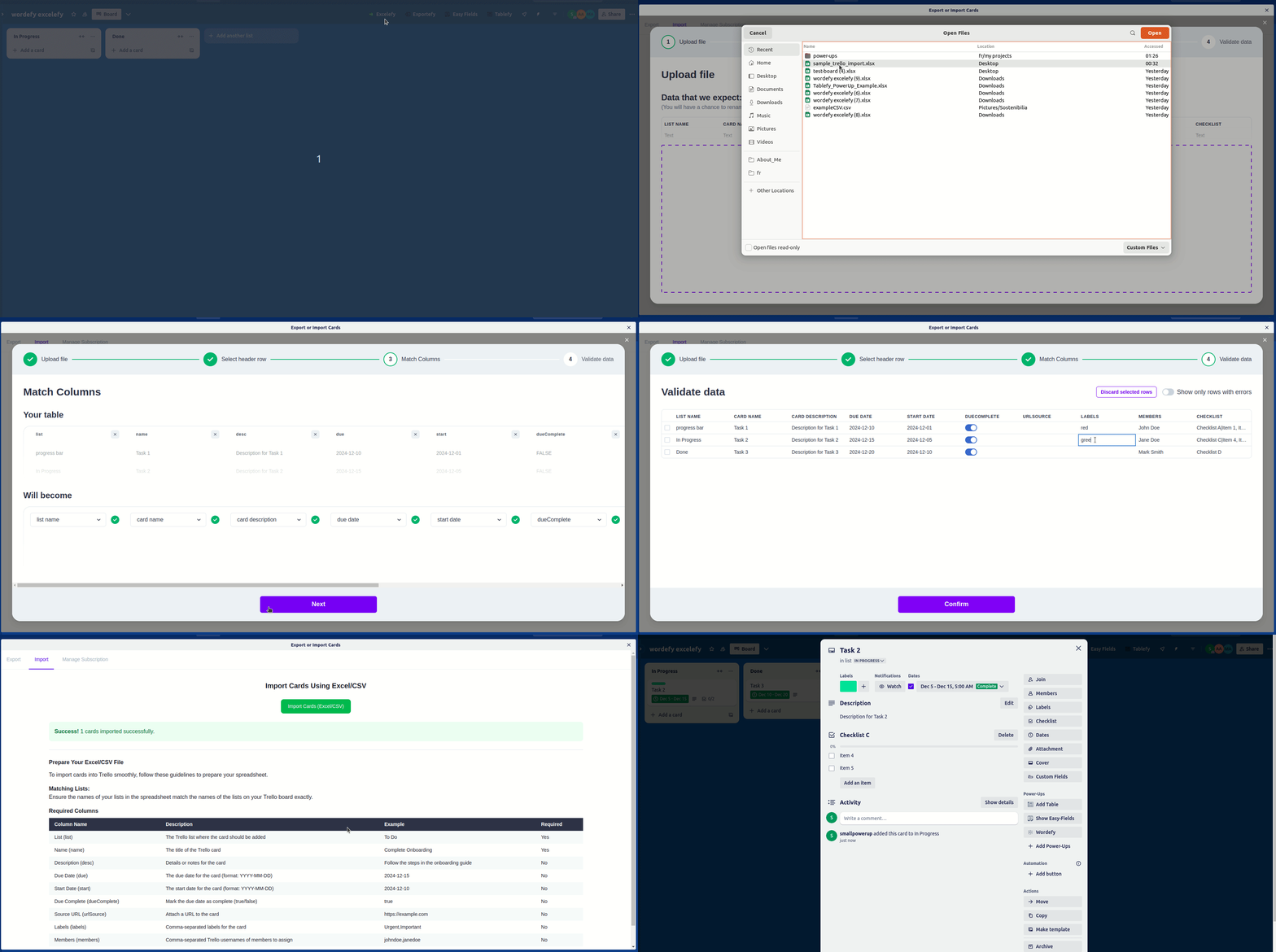
Upload a sheet and Excelefy builds the cards. Map your columns once in the guided importer, review the rows, and every field on the sheet lands on the card — descriptions, dates, labels, members, checklists and custom field values included.
import

A true round trip: export, edit in Excel, import back

Excelefy writes exactly the columns it reads. Export a board, make your edits in Excel or Google Sheets, and import the file straight back with nothing lost in between — the promise the product is named for, and the thing that separates it from tools that only go one way.

Re-import updates your cards instead of duplicating them

Keep a master sheet and let Trello follow it. Switch the import to "update existing cards" and the Card URL column becomes the key: a row that names a card updates that card, a row that names none creates a new one, and a blank cell leaves the card's existing value alone. Write [clear] when you actually want a field emptied. Nothing is ever deleted — a card that is missing from your sheet is left exactly as it is.

Import into any board, and any list you choose

Pick the destination board — any board you can edit, not only the one the Power-Up is open on — and then either use the List Name column in your file or send every row to one list you select. That second mode means the file most people actually have, a bare column of card names, imports as-is.

Missing lists created automatically

Before a single card is written, Excelefy resolves every list your file names. Turn on "create missing lists" and it makes them for you; leave it off and the import stops cleanly with the list named, rather than importing half your sheet and failing on the rest.

See exactly what will happen before anything is written

Every import opens with a dry run: how many cards will be created, how many existing cards updated, which lists they go to, which lists would be created, any labels or members that cannot be found, and roughly how long it will take. Nothing touches your board until you confirm it.

Failed rows come back as a spreadsheet you can fix and re-import

If some rows do not produce a card, download them as a file with the reason on each row — in the same format the importer already accepts, so correcting the cells and importing again is a two-minute job. Cancel a long run and you get the same file back, which makes it a resume.

Import without a file — just paste

Paste a list of card names out of an email or a chat message, or a block of cells straight out of Excel or Google Sheets, and Excelefy drops them into the same importer. Column mapping, validation, the dry run and the error report all work exactly as they do for an uploaded file.

Custom fields, both directions, every Trello type

Text, number, date, checkbox and dropdown custom fields export into their own columns and import back from them, with dropdowns matched by their option text. The spreadsheet that already holds your custom data becomes the one you import.

Labels, members, checklists and covers

Labels and members are comma-separated names or usernames. Checklists carry their items. Cover colours travel in a single Cover column — "blue", or "blue full" for a full-width cover. An unrecognised label or member costs you that value and a warning, never the card.

Choose what you export

Pick the columns you want rather than taking all of them, filter by label, member or due date, and include archived cards when you need them. The export you send to a stakeholder does not have to be the export you re-import.

Built for boards that are actually big

Large imports used to be where spreadsheet tools quietly lose data. Every write to Trello is paced to the API budget and retried with backoff when Trello pushes back, with a live progress bar and a cancel button throughout — so a several-hundred-card import finishes, and you can see it finishing.

Your board data stays in your browser

Excelefy talks to Trello directly from your browser. Your board contents and your Trello token are never sent to or stored on our servers — the file is built on your machine, and the cards are written from it.

Need Word or PDF instead?

Excelefy writes Excel and CSV because those are the formats it can read back in. When you need Word, PDF, JSON or XML, Exportefy — the same suite, and included in the All Power-Ups subscription — covers those formats along with attachments and comments.

Free to try, then one simple subscription

Use Excelefy free with up to 20 rows per import or export, no card required to install. Every plan starts with a 7-day free trial that lifts the row cap, and a paid subscription removes every limit. The All Power-Ups plan covers Excelefy and the rest of the suite together.

Stripe Customer Portal

Access and manage/cancel your subscription details effortlessly in the Stripe Customer Portal. Modify your plan, update payment methods, review billing history or cancel your subscription with ease, all in one secure location. Designed for a seamless user experience, our portal simplifies subscription management for all users.
Button for accessing subscription customization options

Try Excelefy on your own board

Installs in seconds from the Trello directory. Full access for 7 days — cancel before it ends and you pay nothing.

Start my free trial of Excelefy

Questions before you start

Is Excelefy free to try?+

Yes. Every plan starts with a 7-day free trial with full access to every feature. You can cancel at any point during the trial and you will not be charged.

How much does Excelefy cost after the trial?+

Excelefy on its own is $5.99/month or $49/year. If you use more than two of our Power-Ups, the All Power-Ups bundle is better value at $12.99/month or $99/year and includes everything we make.

Do I pay per board or per person?+

Per person. One subscription covers you across unlimited boards and unlimited workspaces — you are never charged again for adding another board.

Can I cancel whenever I want?+

Yes. Manage or cancel your subscription yourself in the Stripe customer portal, reachable from inside the Power-Up. There is no contract and no cancellation fee.

Does Excelefy work with the rest of my board?+

Excelefy installs from the Trello Power-Up directory and works inside your existing boards. There is nothing to configure, no separate account to create, and it supports Trello's dark mode.

What happens to my data?+

Your board data stays in Trello. We do not sell it, and we do not need to see it to do our job. Full details are in our privacy policy.

Teams using Excelefy also add

All of these are included in the $12.99/month bundle.

Need Excelefy to do something it doesn't?

We build custom Power-Ups and take on feature requests. Tell us what you need and we'll reply within 48 hours with feasibility and a rough estimate.

Talk to us about custom work →

Excelefy

7-day free trial · from $5.99/mo

Add free
